
How to Protect Your Data When Building an AI Product
Somewhere in the middle of adding an AI feature, a lot of founders hit the same moment. A customer's security team asks, "Where does our data go once your AI touches it?" Or a board member asks it. Or, if nobody else does, the founder eventually asks it of themselves — usually right before a launch, which is the worst possible time to be figuring out the answer.
It's a fair question, and it deserves a better answer than "we're using a reputable AI provider, so it's fine." Reputable doesn't mean automatic. Once an AI integration feature sends data to a model։ a support ticket, a customer record, an internal document, or a voice recording that data has a new destination with its own rules about what happens next.
This isn't simply a legal problem to hand off to a lawyer, and it isn't a generic cybersecurity problem solved by encryption and firewalls. It's an architecture and vendor-decision problem, and it belongs to whoever is building the product. The good news is that it's manageable, a handful of concrete decisions rather than an abstract cloud of "AI risk." And like most engineering risk, it's cheaper to decide upfront than to fix after the fact. This guide walks through what those decisions are — a practical starting point for AI security for startups whether you're building an AI product from scratch or adding AI to something that already has real customers and real data in it.
What "Protecting Data" Actually Means in an AI Product
Every AI feature quietly adds a new data flow to your product, and that flow needs its own answer, not a borrowed one.
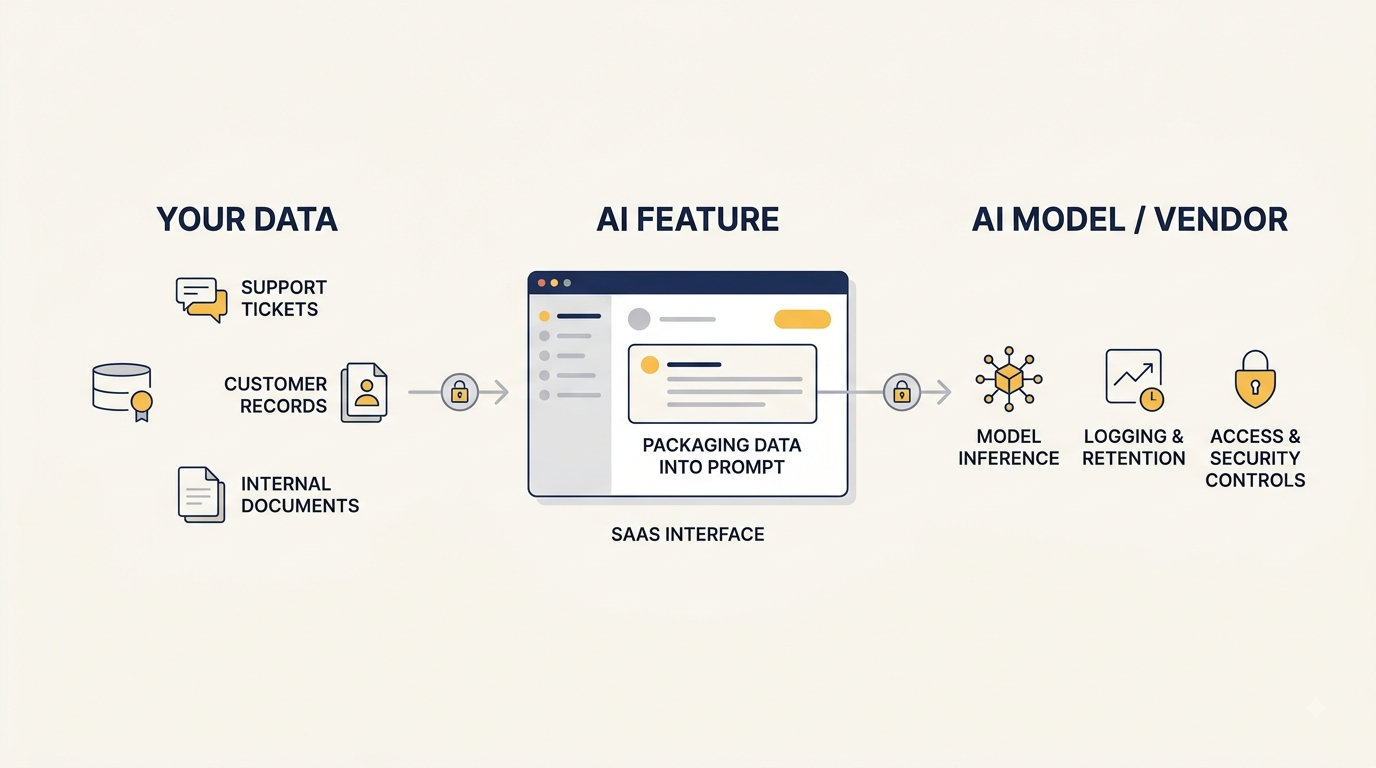
Take a support ticket summarization feature. Before AI, that ticket text lived in your database, covered by whatever access controls you already had. Add AI, and the same text now gets packaged into a prompt and sent to a third-party API, a flow that didn't exist in your architecture last quarter. What does the vendor do with that prompt? How long do they keep it? Who can see it on their side?
Standard security practices, access control, encryption, secure infrastructure are still necessary, but they don't answer those questions on their own. Protecting data in an AI product means tracking these new flows deliberately: know exactly what data moves toward a model, and make a few deliberate decisions about it.
Why This Is Cheaper to Design In Than Retrofit
Teams that get this right tend to have made these decisions before writing the integration code. Teams that struggle tend to discover the gap later, during a customer's security review, during due diligence, or after an incident.
In our experience at BeeWeb working on SaaS products, this is one of the easiest AI data risks to overlook. A team adds an AI-powered search feature that indexes customer documents into embeddings for faster retrieval, and it works well in testing. What nobody scoped carefully was permissioning: the embeddings weren't filtered by customer tenant, so search results could occasionally surface content from the wrong account. Fixing it after launch means re-architecting the retrieval layer, re-indexing everything, and having an uncomfortable conversation with affected customers. Scoping access correctly from the start would have taken a few extra days of planning.
Designing this in is a conversation; retrofitting it is a rebuild. That doesn't mean solving every hypothetical risk before writing a line of code, it means making a short list of deliberate decisions, covered below, while the architecture is still easy to change.
⚠️The Three Places Your Data Is at Risk in an AI Feature
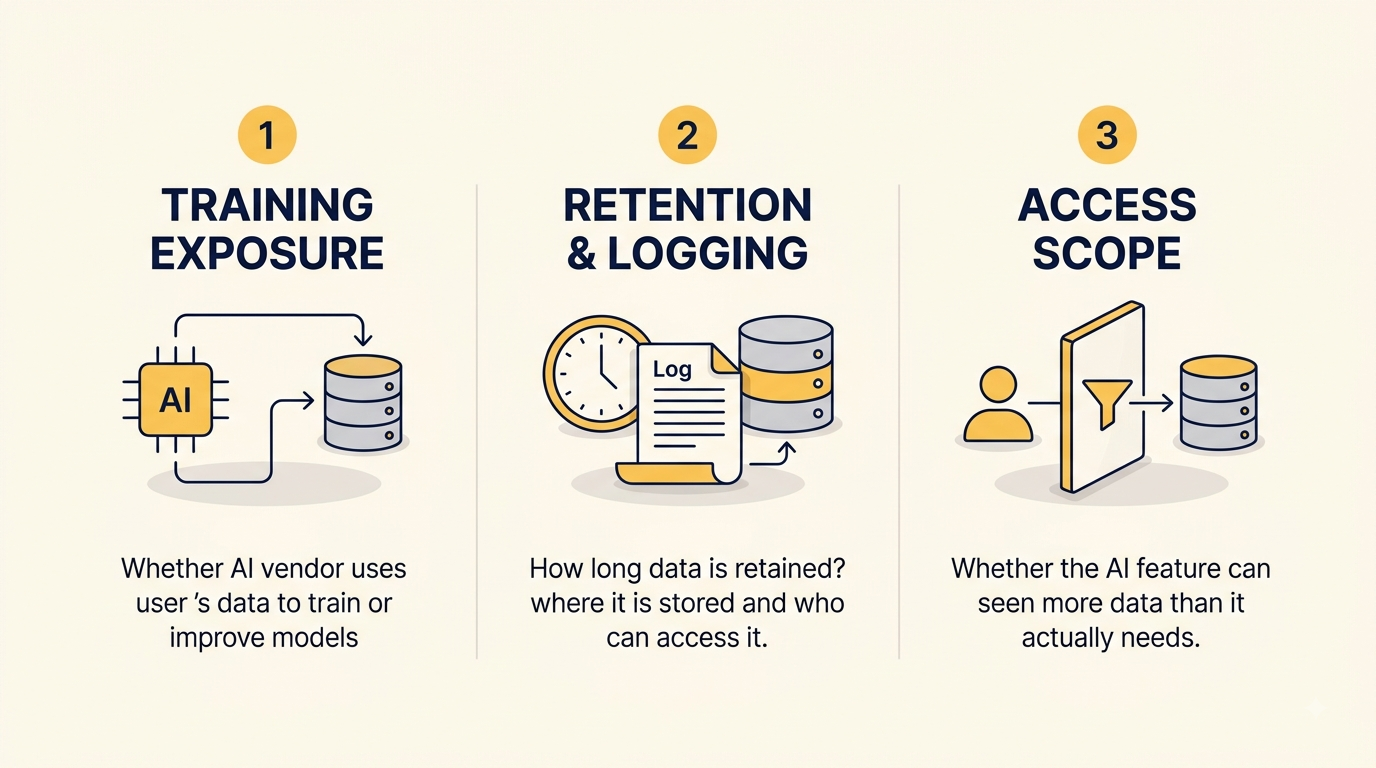
"AI data risk" sounds abstract until you break it into where it actually lives. In practice, it comes down to three categories.
Training Exposure
Does the AI vendor use your data or your customers' data to train or improve their models?
It depends entirely on the vendor and the specific plan or API tier. Many providers offer enterprise or business-tier access with training opt-out or no-training-by-default terms that differ from their free consumer products but this isn't universal, and it isn't static. Check the vendor's current terms for the specific product and tier you're actually using, rather than assuming based on reputation or a year-old blog post.
For more detail on AI-specific risks, see the OWASP Top 10 for LLM Applications.
Retention and Logging
Even if a vendor doesn't train on your data, they typically retain it for some period։ for abuse monitoring, debugging, or legal reasons. How long is it kept? Where is it stored? Who inside the vendor's organization can access those logs, and under what circumstances?
This matters most in two moments: responding to a customer's data deletion request, and explaining what happened to specific data during an incident review. Not knowing the answer isn't dangerous by itself, but it's the kind of gap that becomes very visible at exactly the wrong time.
Access Scope
This is largely within your control, which makes it the most important to get right early: can your AI feature see more data than it actually needs?
A common example: a support chatbot is built to answer order-status questions, but instead of querying just the order table, it's given a broader database connection because it was faster to set up. Every prompt sent to the model could then include billing details, shipping addresses, or other customers' records data the feature never needed, now sitting in a prompt log on the vendor's side as well as your own. The same principle applies to AI-powered recruitment systems, where CVs and candidate profiles may contain far more personal information than a matching feature actually needs. The fix is straightforward, scope the query to exactly what the feature needs but it has to be a deliberate choice, because the easy default is almost always the broader one.
Training exposure and retention are largely about your vendor. Access scope is about your architecture, and it's the one you can fix regardless of which vendor you choose.
Building AI-Native vs. Adding AI to an Existing Product
The three risk areas apply either way, but where you start and what's already at stake, looks different depending on whether you're building something new or extending something with customers already in it.
If You're Building an AI Product From Scratch
There's nothing to retrofit. You can decide what data reaches the model, choose a vendor partly based on how they handle training and retention, and design access scope in from day one.
The main risk here isn't technical — it's sequencing. It's tempting to get the AI feature working first and think about data handling once the demo looks good. That's usually where the expensive shortcuts get taken. Deciding your data flows before writing the integration is a small amount of upfront thinking that saves a much larger amount of rework.
If You're Adding AI to an Existing SaaS Product
You likely already made data promises to your customers before AI was part of the plan. Privacy policies, enterprise contracts, and security questionnaires often already state explicitly or implicitly, how customer data is handled and who it's shared with, especially in products handling sensitive documents, such as AI-powered legal platforms.
An AI vendor is, technically, a new third party in that picture. If your existing terms say customer data isn't shared with third parties, or stays within a certain region, adding an AI feature can quietly put you in tension with commitments you already made — not because anyone did anything wrong, but because nobody checked.
Before building, audit what data the new feature will actually touch and check it against what you've already promised customers. Treat the AI vendor as a new third party in your data-processing picture and, where applicable, as a subprocessor in your stack.
🔍What to Check Before Choosing an AI Vendor
Most of the risk above gets addressed by asking a short list of direct questions before signing anything:
🔸Does this specific plan or API tier train on our data, and is there an opt-out?
🔸What's the data retention period, and can we request deletion?
🔸 Is a Data Processing Agreement (DPA) available, and does it cover our intended use?
🔸 Where is data processed and stored, and does that matter for our customers or industry?
🔸 Who at the vendor can access logs of our data, and under what circumstances?
Whether you need a DPA, whether data residency matters, and whether frameworks like GDPR, HIPAA, or SOC 2 apply depend on your specific data, industry, and jurisdiction, not on the fact that you're using AI. AI-specific regulations are also emerging in a number of jurisdictions, separate from these established frameworks, and may apply depending on where your business and customers are located. This article can point you toward the right questions; it can't tell you which regulations apply to your situation. That's worth confirming with qualified legal counsel, particularly if you handle health, financial, or other regulated data.
Practical Architecture Principles
A few architectural habits meaningfully reduce AI-specific data risk, and none require a security team to implement.
These principles also align with the broader approach outlined in the NIST AI Risk Management Framework .
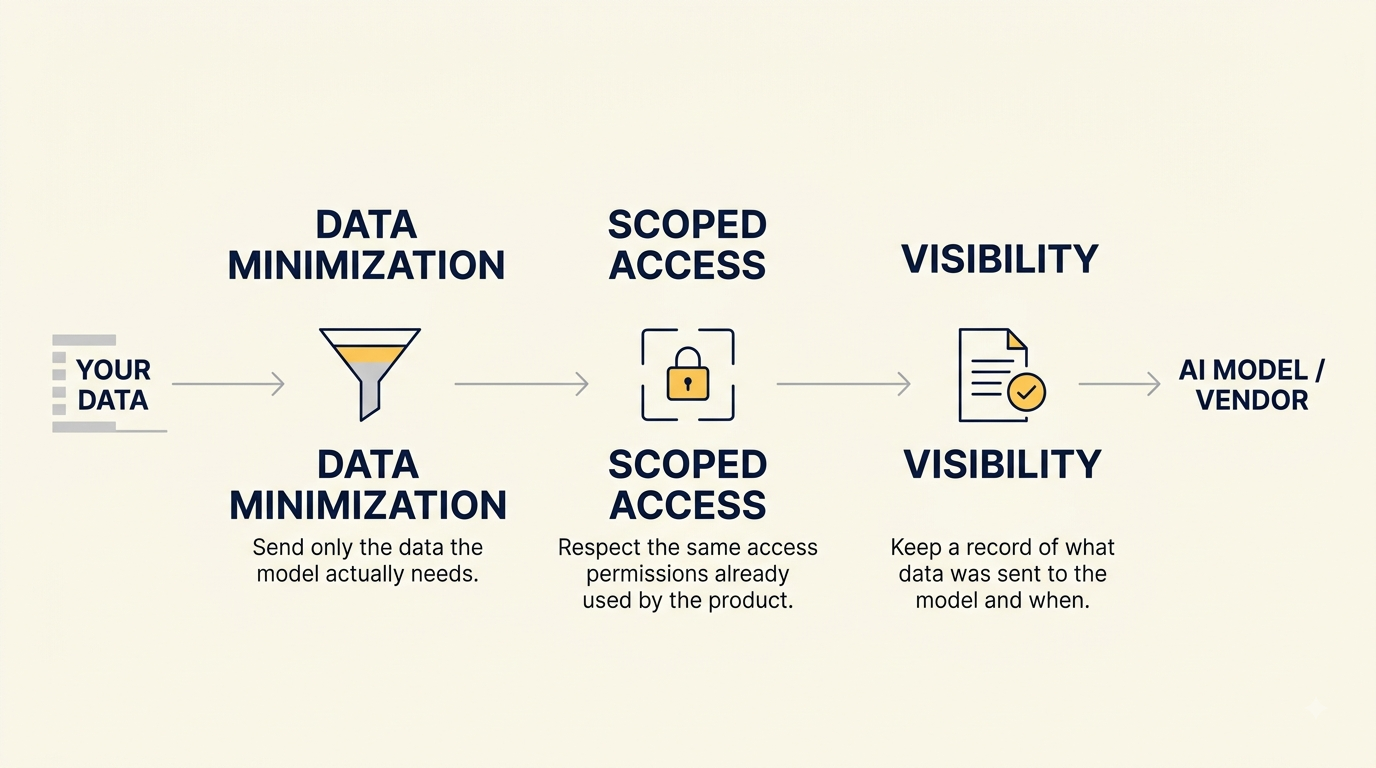
Data minimization. Send the model only what it needs, not the full record it's attached to. If a feature summarizes a support ticket, strip billing details or unrelated account data from the prompt before it's constructed, rather than passing the entire customer object.
Scoped access. Retrieval systems։ RAG pipelines, embeddings, search indexes should respect the same permission boundaries your product already has, not bypass them for convenience. If a user couldn't see a document normally, the AI feature shouldn't surface it either.
Visibility. Keep a record of what data was sent to the model and when, even in simple form — enough to answer "what did the AI see" in plain language if a customer, auditor, or your own team asks, instead of reconstructing it after the fact.
These three habits cover a large part of the gap between "we integrated an AI API" and "we can explain how our AI feature handles data", usually the actual bar customers and security reviewers check against.
The list below is a quick way to check where you actually stand against everything above.
For a broader set of practical AI risk-management actions, the NIST AI RMF Playbook is a useful reference.
AI Data Protection Checklist
A short list to work through before or during an AI feature build:
🟠 We know exactly what data is sent to the AI model for each feature.
🟠 We know whether our AI vendor's specific plan trains on our data, and whether an opt-out applies to us.
🟠 We know how long prompts and outputs are retained, and by whom.
🟠 The AI feature only accesses data it actually needs no broader access than necessary.
🟠We've checked whether adding AI conflicts with data commitments we've already made to customers.
🟠 We have a Data Processing Agreement in place if our use case requires one.
🟠 We can explain, in plain language, what happens to data in our AI feature if someone asks.
If you can check every box, you're in a much stronger position to explain and defend how your AI feature handles data.
Data protection is only one part of being production-ready; validating how users actually interact with the feature is another.
Key Takeaways
None of this requires treating AI like a uniquely dangerous technology, and it doesn't require a compliance department. It requires the same thing most engineering risk does: deciding early, deliberately, and in plain language. Know what data reaches the model, understand what your vendor does with it, and make sure the feature only sees what it actually needs.
The teams that handle this well aren't necessarily the most cautious ones, they're the ones who treat "what does our AI feature do with data" as a normal product question, answerable in a sentence or two, rather than something that only gets looked at once a customer asks. That's a reasonable bar, and one most teams can meet without slowing down the build.
If you're currently planning an AI feature and want a second set of eyes on how the data flows are shaping up, that's a conversation worth having before the architecture is set rather than after.
FAQ
❓Does using a third-party AI API mean my data trains their models?
Not necessarily, it depends on the vendor and the specific plan or API tier. Many providers offer business or enterprise tiers with training opt-out or no-training-by-default terms, different from their free or consumer products. Check the current terms for the exact product you're using rather than assuming based on reputation.
❓What's a Data Processing Agreement (DPA), and do I need one with my AI vendor?
A DPA is a contract governing how a vendor processes data on your behalf. Whether you need one depends on your data, industry, and jurisdiction. Many AI vendors offer one on request for business customers; confirm the specifics with legal counsel.
❓Is it safe to send customer data to an LLM API?
It can be, provided you understand the vendor's training, retention, and access policies for your specific plan, and limit what's sent to what the feature actually needs. Sending full, unscoped customer records by default is the pattern most worth avoiding.
❓Does adding an AI feature require GDPR, HIPAA, or SOC 2 compliance?
It depends on your data, industry, and where your customers are located, not on the fact that you're using AI. These frameworks may already apply regardless of AI, or an AI feature may introduce new considerations under them. Work through this with legal counsel rather than assume either way.
❓What's the difference between data security and data privacy in an AI context?
Data security covers protecting data from unauthorized access generally encryption, access control, infrastructure. Data privacy in an AI context is more specific: what happens once data reaches a model whether it's used for training, how long it's retained, and who can access it on the vendor's side.
❓What should I ask before connecting an AI feature to internal company data?
Start with scope, not access: does the feature need everything in a given system, or only a subset? Who normally has permission to see that data today, and does the AI feature respect those same boundaries? If the feature uses retrieval, confirm it's filtered by the same permissions a user would have not by the AI's own broader access. Most unintended exposure comes from skipping this step, not from anything vendor-related.
Read also:
What Type of Developer Do You Need to Build an AI Product?
AI Integration Buyer's Guide for SaaS Founders (2026)